| # Contributing Quick Start |
| |
| rust-analyzer is an ordinary Rust project, which is organized as a Cargo workspace, builds on stable and doesn't depend on C libraries. |
| So, just |
| |
| ``` |
| $ cargo test |
| ``` |
| |
| should be enough to get you started! |
| |
| To learn more about how rust-analyzer works, see [./architecture.md](./architecture.md). |
| It also explains the high-level layout of the source code. |
| Do skim through that document. |
| |
| We also publish rustdoc docs to pages: https://rust-lang.github.io/rust-analyzer/ide/. |
| Note though, that the internal documentation is very incomplete. |
| |
| Various organizational and process issues are discussed in this document. |
| |
| # Getting in Touch |
| |
| rust-analyzer is a part of the [RLS-2.0 working |
| group](https://github.com/rust-lang/compiler-team/tree/6a769c13656c0a6959ebc09e7b1f7c09b86fb9c0/working-groups/rls-2.0). |
| Discussion happens in this Zulip stream: |
| |
| https://rust-lang.zulipchat.com/#narrow/stream/185405-t-compiler.2Frust-analyzer |
| |
| # Issue Labels |
| |
| * [good-first-issue](https://github.com/rust-lang/rust-analyzer/labels/good%20first%20issue) |
| are good issues to get into the project. |
| * [E-has-instructions](https://github.com/rust-lang/rust-analyzer/issues?q=is%3Aopen+is%3Aissue+label%3AE-has-instructions) |
| issues have links to the code in question and tests. |
| * [Broken Window](https://github.com/rust-lang/rust-analyzer/issues?q=is:issue+is:open+label:%22Broken+Window%22) |
| are issues which are not necessarily critical by themselves, but which should be fixed ASAP regardless, to avoid accumulation of technical debt. |
| * [E-easy](https://github.com/rust-lang/rust-analyzer/issues?q=is%3Aopen+is%3Aissue+label%3AE-easy), |
| [E-medium](https://github.com/rust-lang/rust-analyzer/issues?q=is%3Aopen+is%3Aissue+label%3AE-medium), |
| [E-hard](https://github.com/rust-lang/rust-analyzer/issues?q=is%3Aopen+is%3Aissue+label%3AE-hard), |
| [E-unknown](https://github.com/rust-lang/rust-analyzer/issues?q=is%3Aopen+is%3Aissue+label%3AE-unknown), |
| labels are *estimates* for how hard would be to write a fix. Each triaged issue should have one of these labels. |
| * [S-actionable](https://github.com/rust-lang/rust-analyzer/issues?q=is%3Aopen+is%3Aissue+label%3AS-actionable) and |
| [S-unactionable](https://github.com/rust-lang/rust-analyzer/issues?q=is%3Aopen+is%3Aissue+label%3AS-unactionable) |
| specify if there are concrete steps to resolve or advance an issue. Roughly, actionable issues need only work to be fixed, |
| while unactionable ones are blocked either on user feedback (providing a reproducible example), or on larger architectural |
| work or decisions. This classification is descriptive, not prescriptive, and might be wrong: Any unactionable issue might have a simple fix that we missed. |
| Each triaged issue should have one of these labels. |
| * [fun](https://github.com/rust-lang/rust-analyzer/issues?q=is%3Aopen+is%3Aissue+label%3Afun) |
| is for cool, but probably hard stuff. |
| * [Design](https://github.com/rust-lang/rust-analyzer/issues?q=is%3Aopen+is%3Aissue+label%Design) |
| is for moderate/large scale architecture discussion. |
| Also a kind of fun. |
| These issues should generally include a link to a Zulip discussion thread. |
| |
| # Code Style & Review Process |
| |
| Do see [./style.md](./style.md). |
| |
| # Cookbook |
| |
| ## CI |
| |
| We use GitHub Actions for CI. |
| Most of the things, including formatting, are checked by `cargo test`. |
| If `cargo test` passes locally, that's a good sign that CI will be green as well. |
| The only exception is that some long-running tests are skipped locally by default. |
| Use `env RUN_SLOW_TESTS=1 cargo test` to run the full suite. |
| |
| We use bors to enforce the [not rocket science](https://graydon2.dreamwidth.org/1597.html) rule. |
| |
| ## Launching rust-analyzer |
| |
| Debugging the language server can be tricky. |
| LSP is rather chatty, so driving it from the command line is not really feasible, driving it via VS Code requires interacting with two processes. |
| |
| For this reason, the best way to see how rust-analyzer works is to **find a relevant test and execute it**. |
| VS Code & Emacs include an action for running a single test. |
| |
| Launching a VS Code instance with a locally built language server is also possible. |
| There's **"Run Extension (Debug Build)"** launch configuration for this in VS Code. |
| |
| In general, I use one of the following workflows for fixing bugs and implementing features: |
| |
| If the problem concerns only internal parts of rust-analyzer (i.e. I don't need to touch the `rust-analyzer` crate or TypeScript code), there is a unit-test for it. |
| So, I use **rust-analyzer: Run** action in VS Code to run this single test, and then just do printf-driven development/debugging. |
| As a sanity check after I'm done, I use `cargo xtask install --server` and **Reload Window** action in VS Code to verify that the thing works as I expect. |
| |
| If the problem concerns only the VS Code extension, I use **Run Installed Extension** launch configuration from `launch.json`. |
| Notably, this uses the usual `rust-analyzer` binary from `PATH`. |
| For this, it is important to have the following in your `settings.json` file: |
| ```json |
| { |
| "rust-analyzer.server.path": "rust-analyzer" |
| } |
| ``` |
| After I am done with the fix, I use `cargo xtask install --client` to try the new extension for real. |
| |
| If I need to fix something in the `rust-analyzer` crate, I feel sad because it's on the boundary between the two processes, and working there is slow. |
| I usually just `cargo xtask install --server` and poke changes from my live environment. |
| Note that this uses `--release`, which is usually faster overall, because loading stdlib into debug version of rust-analyzer takes a lot of time. |
| To speed things up, sometimes I open a temporary hello-world project which has `"rust-analyzer.cargo.sysroot": null` in `.code/settings.json`. |
| This flag causes rust-analyzer to skip loading the sysroot, which greatly reduces the amount of things rust-analyzer needs to do, and makes printf's more useful. |
| Note that you should only use the `eprint!` family of macros for debugging: stdout is used for LSP communication, and `print!` would break it. |
| |
| If I need to fix something simultaneously in the server and in the client, I feel even more sad. |
| I don't have a specific workflow for this case. |
| |
| Additionally, I use `cargo run --release -p rust-analyzer -- analysis-stats path/to/some/rust/crate` to run a batch analysis. |
| This is primarily useful for performance optimizations, or for bug minimization. |
| |
| ## TypeScript Tests |
| |
| If you change files under `editors/code` and would like to run the tests and linter, install npm and run: |
| |
| ```bash |
| cd editors/code |
| npm ci |
| npm run lint |
| ``` |
| ## How to ... |
| |
| * ... add an assist? [#7535](https://github.com/rust-lang/rust-analyzer/pull/7535) |
| * ... add a new protocol extension? [#4569](https://github.com/rust-lang/rust-analyzer/pull/4569) |
| * ... add a new configuration option? [#7451](https://github.com/rust-lang/rust-analyzer/pull/7451) |
| * ... add a new completion? [#6964](https://github.com/rust-lang/rust-analyzer/pull/6964) |
| * ... allow new syntax in the parser? [#7338](https://github.com/rust-lang/rust-analyzer/pull/7338) |
| |
| ## Logging |
| |
| Logging is done by both rust-analyzer and VS Code, so it might be tricky to figure out where logs go. |
| |
| Inside rust-analyzer, we use the [`tracing`](https://docs.rs/tracing/) crate for logging, |
| and [`tracing-subscriber`](https://docs.rs/tracing-subscriber) for logging frontend. |
| By default, log goes to stderr, but the stderr itself is processed by VS Code. |
| `--log-file <PATH>` CLI argument allows logging to file. |
| Setting the `RA_LOG_FILE=<PATH>` environment variable will also log to file, it will also override `--log-file`. |
| |
| To see stderr in the running VS Code instance, go to the "Output" tab of the panel and select `rust-analyzer`. |
| This shows `eprintln!` as well. |
| Note that `stdout` is used for the actual protocol, so `println!` will break things. |
| |
| To log all communication between the server and the client, there are two choices: |
| |
| * You can log on the server side, by running something like |
| ``` |
| env RA_LOG=lsp_server=debug code . |
| ``` |
| * You can log on the client side, by enabling `"rust-analyzer.trace.server": "verbose"` workspace setting. |
| These logs are shown in a separate tab in the output and could be used with LSP inspector. |
| Kudos to [@DJMcNab](https://github.com/DJMcNab) for setting this awesome infra up! |
| |
| |
| There are also several VS Code commands which might be of interest: |
| |
| * `rust-analyzer: Status` shows some memory-usage statistics. |
| |
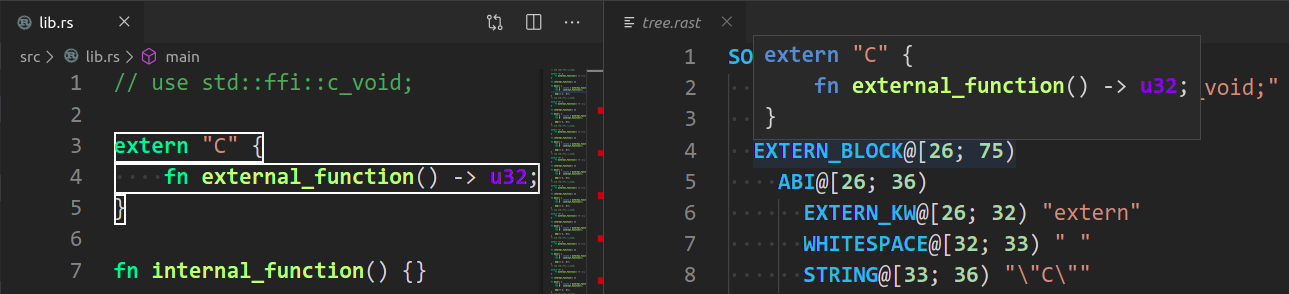
| * `rust-analyzer: Syntax Tree` shows syntax tree of the current file/selection. |
| |
| * `rust-analyzer: View Hir` shows the HIR expressions within the function containing the cursor. |
| |
| You can hover over syntax nodes in the opened text file to see the appropriate |
| rust code that it refers to and the rust editor will also highlight the proper |
| text range. |
| |
| If you trigger Go to Definition in the inspected Rust source file, |
| the syntax tree read-only editor should scroll to and select the |
| appropriate syntax node token. |
| |
|  |
| |
| ## Profiling |
| |
| We have a built-in hierarchical profiler, you can enable it by using `RA_PROFILE` env-var: |
| |
| ``` |
| RA_PROFILE=* // dump everything |
| RA_PROFILE=foo|bar|baz // enabled only selected entries |
| RA_PROFILE=*@3>10 // dump everything, up to depth 3, if it takes more than 10 ms |
| ``` |
| |
| In particular, I have `export RA_PROFILE='*>10'` in my shell profile. |
| |
| We also have a "counting" profiler which counts number of instances of popular structs. |
| It is enabled by `RA_COUNT=1`. |
| |
| To measure time for from-scratch analysis, use something like this: |
| |
| ``` |
| $ cargo run --release -p rust-analyzer -- analysis-stats ../chalk/ |
| ``` |
| |
| For measuring time of incremental analysis, use either of these: |
| |
| ``` |
| $ cargo run --release -p rust-analyzer -- analysis-bench ../chalk/ --highlight ../chalk/chalk-engine/src/logic.rs |
| $ cargo run --release -p rust-analyzer -- analysis-bench ../chalk/ --complete ../chalk/chalk-engine/src/logic.rs:94:0 |
| ``` |
| |
| Look for `fn benchmark_xxx` tests for a quick way to reproduce performance problems. |
| |
| ## Release Process |
| |
| Release process is handled by `release`, `dist`, `publish-release-notes` and `promote` xtasks, `release` being the main one. |
| |
| `release` assumes that you have checkouts of `rust-analyzer`, `rust-analyzer.github.io`, and `rust-lang/rust` in the same directory: |
| |
| ``` |
| ./rust-analyzer |
| ./rust-analyzer.github.io |
| ./rust-rust-analyzer # Note the name! |
| ``` |
| |
| The remote for `rust-analyzer` must be called `upstream` (I use `origin` to point to my fork). |
| In addition, for `xtask promote` (see below), `rust-rust-analyzer` must have a `rust-analyzer` remote pointing to this repository on GitHub. |
| |
| `release` calls the GitHub API calls to scrape pull request comments and categorize them in the changelog. |
| This step uses the `curl` and `jq` applications, which need to be available in `PATH`. |
| Finally, you need to obtain a GitHub personal access token and set the `GITHUB_TOKEN` environment variable. |
| |
| Release steps: |
| |
| 1. Set the `GITHUB_TOKEN` environment variable. |
| 2. Inside rust-analyzer, run `cargo xtask release`. This will: |
| * checkout the `release` branch |
| * reset it to `upstream/nightly` |
| * push it to `upstream`. This triggers GitHub Actions which: |
| * runs `cargo xtask dist` to package binaries and VS Code extension |
| * makes a GitHub release |
| * publishes the VS Code extension to the marketplace |
| * call the GitHub API for PR details |
| * create a new changelog in `rust-analyzer.github.io` |
| 3. While the release is in progress, fill in the changelog |
| 4. Commit & push the changelog |
| 5. Run `cargo xtask publish-release-notes <CHANGELOG>` -- this will convert the changelog entry in AsciiDoc to Markdown and update the body of GitHub Releases entry. |
| 6. Tweet |
| 7. Inside `rust-analyzer`, run `cargo xtask promote` -- this will create a PR to rust-lang/rust updating rust-analyzer's subtree. |
| Self-approve the PR. |
| |
| If the GitHub Actions release fails because of a transient problem like a timeout, you can re-run the job from the Actions console. |
| If it fails because of something that needs to be fixed, remove the release tag (if needed), fix the problem, then start over. |
| Make sure to remove the new changelog post created when running `cargo xtask release` a second time. |
| |
| We release "nightly" every night automatically and promote the latest nightly to "stable" manually, every week. |
| |
| We don't do "patch" releases, unless something truly egregious comes up. |
| To do a patch release, cherry-pick the fix on top of the current `release` branch and push the branch. |
| There's no need to write a changelog for a patch release, it's OK to include the notes about the fix into the next weekly one. |
| Note: we tag releases by dates, releasing a patch release on the same day should work (by overwriting a tag), but I am not 100% sure. |
| |
| ## Permissions |
| |
| There are three sets of people with extra permissions: |
| |
| * rust-analyzer GitHub organization [**admins**](https://github.com/orgs/rust-analyzer/people?query=role:owner) (which include current t-compiler leads). |
| Admins have full access to the org. |
| * [**review**](https://github.com/orgs/rust-analyzer/teams/review) team in the organization. |
| Reviewers have `r+` access to all of organization's repositories and publish rights on crates.io. |
| They also have direct commit access, but all changes should via bors queue. |
| It's ok to self-approve if you think you know what you are doing! |
| bors should automatically sync the permissions. |
| Feel free to request a review or assign any PR to a reviewer with the relevant expertise to bring the work to their attention. |
| Don't feel pressured to review assigned PRs though. |
| If you don't feel like reviewing for whatever reason, someone else will pick the review up! |
| * [**triage**](https://github.com/orgs/rust-analyzer/teams/triage) team in the organization. |
| This team can label and close issues. |
| |
| Note that at the time being you need to be a member of the org yourself to view the links. |
